Don’t Let Your Images Go Silent… Give Them a Voice with Alt Text
When most people think about web design, they think about picture layouts, colors, and fonts. However, one detail that often gets overlooked or misused is alt text.

It may seem minor, but effective alt text can:
- Improve website accessibility for people using screen readers
- Help search engines understand your content and rank your images
- Enhance the experience for every visitor, especially when images don’t load
- Make your site easier for AI tools (like ChatGPT, Bing Copilot, and Perplexity) to interpret
- Protect your business from accessibility lawsuits
What Is Alt Text?
Alt text, short for “alternative text,” is a brief written description added to an image in your website’s code. If the image fails to load, the alt text appears instead, letting users know what the image represents. People using screen readers rely on alt text to understand visual content, making it a crucial part of creating an accessible website. Web browsers and assistive technologies also read alt text aloud or display it when images don’t load, ensuring users get the information even without the visual.
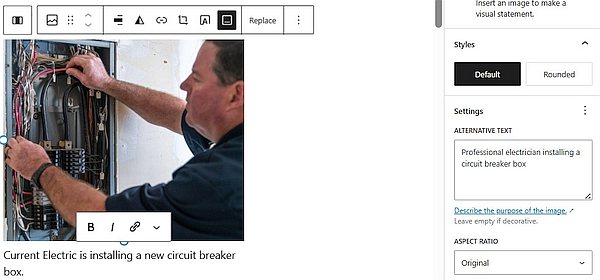
Beyond accessibility, alt text also helps search engines “see” your images, allowing them to appear in Google Images and other search results. Additionally, if an image doesn’t display due to slow internet or a broken link, alt text ensures your message still gets through. Increasingly, AI bots and tools like ChatGPT, Bing Chat (CoPilot), and Perplexity also use alt text to interpret your images, so accurate descriptions make your site easier for people and AI to understand. Without it, AI may misinterpret or ignore visual content, leading to incomplete or inaccurate representations of your website.
5 Tips for Using Alt Text for Accessibility and SEO
1. Be Specific and Concise
Alt text should clearly describe what’s in the image, without overcomplicating things. Think of it as explaining the image to someone over the phone. Ideally, it should be under 125 characters.
- ❌ “Electrician North Carolina”
- ✅ “An electrician troubleshooting a home circuit breaker panel”
2. Consider the Context
The same image may require different alt text depending on its use. Ask yourself: Why is this image here? What role does it play?
- On a services page: Alt text for an image of a professional at work should be “Expert electrician performing a safety inspection in a commercial building.”
- On a testimonial page: Alt text for an image of a happy customer with their new outlet should be “Happy customer pointing to the newly installed smart outlet in her kitchen.”
- For a “Request a Quote” button: The alt text should be “Request a Quote” or “Click here to request a free quote.”
3. Use Alt Text for SEO, but Carefully
Alt text helps search engines understand your images, but keyword stuffing hurts accessibility and rankings. Write for people first, search engines second.
- ❌ Wrong: “Electrician electrical wiring electrician service wiring expert.”
- ✅ Better: “Professional electrician installing a circuit box.”
Tip: Remember, browsers and screen readers actually read alt text aloud. If you only add a string of keywords, it doesn’t help users understand the image. Instead of thinking “What keyword should I rank for?” ask, “How would I explain this image to someone who can’t see it?” That approach serves accessibility, SEO, and AI all at once!
4. Skip the words “photo of”
Screen readers already indicate that it’s an image, so there is no need to be repetitive; provide the image description.
- ❌ “Image of a licensed electrician installing a new fuse box.”
- ✅ “Licensed electrician installing a new fuse box.”
5. Leave Decorative Images Blank
A purely decorative image, like background graphics, can be left blank. This helps screen readers and AI focus on important text content on the page.
Understanding WordPress Image Fields
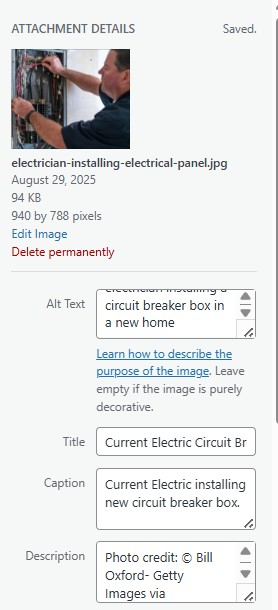
You’ll see four fields when you upload an image to your WordPress Website. Knowing how to use them ensures your images work harder for you:
- Alt Text: The most important field for accessibility and SEO. It’s the description that screen readers read aloud and search engines use to understand your image.
- Title: Primarily for your own organization in the Media Library. Sometimes it appears as a tooltip when hovering over the image.
- Caption: A visible line of text beneath the image on a post or page. Great for providing extra context.
- Description: Internal notes about the image. Rarely shown on your site, mostly for your reference. It useful for adding the photo source for reference.
Alt Text Quick-Use Checklist
When uploading your image and before publishing your blog post or page, run through this checklist:
- Do the words describe the image accurately?
- Is it relevant to the page content?
- Did I avoid unnecessary phrases like “image of”?
- Am I skipping purely decorative images?
- Am I meeting accessibility compliance (essential for online stores)?
- Is it concise (ideally under 125 characters)?
Final Takeaway
Alt text might seem small, but it makes a big difference. Clear, purposeful descriptions make your website more inclusive, boost search visibility, and ensure that people and search engines (including AI) understand your content.
Remember: Alt text isn’t just for better rankings, it’s also about compliance and protecting your business from legal risks.
Every image tells a story. Use alt text to give it a voice everyone can hear.